Eshasoft Desktop Calendar Software - Online Support
Backup Personal Calendar Data
How do I backup my personal data?
Determine where your personal calendar data are saved:
- Open Eshasoft calendar.
- Go to "Options" > "Miscellaneous".
- "Data Folder" field identifies where your personal data are saved.
To backup personal data:
- Close Eshasoft calendar.
- Copy all files in above folder to another folder or CD/DVD/USB/etc.
- Restart Eshasoft calendar.
To restore personal data:
- Close Eshasoft calendar.
- Copy backup files to folder identified in Eshasoft calendar > "Options" > "Miscellaneous" > "Data Folder".
- Restart Eshasoft calendar.
Error Loading Midas.dll
When I run Eshasoft Desktop Calendar, I get an error, "Error loading MIDAS.DLL". How do I fix this problem?
Midas.dll is not registered correctly on your system. To correct this problem:
- Close Eshasoft calendar.
- Download midas.dll from http://www.eshasoft.com/download/system/midas.dll, and save it to "c:\windows\system32\" folder.
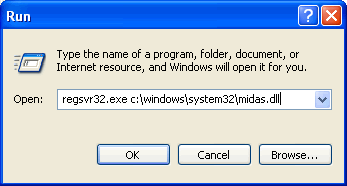
- Register midas.dll, click Start > Run, copy and past: "regsvr32.exe c:\windows\system32\midas.dll", and press OK.
- Restart Eshasoft calendar.
If you experience other problems, please send us the error report. As well, send an email to support@eshasoft.com with a detail description of the problem. Your detailed email will help us to reproduce and fix the problem in a timely manner. Thank you.